
Play
Baseline Rip Screen
BLOB · Episode 26 Explore more from the BLOB seriesBaseline play under 10" Using One-on-one and Blind Screens
Tactical viewer
Use the existing playback controls to study the movement, then review each step below.
Related series:
BLOB
Step by step
Step descriptions
Review the court position and available coaching instructions for each step.

STEP 1
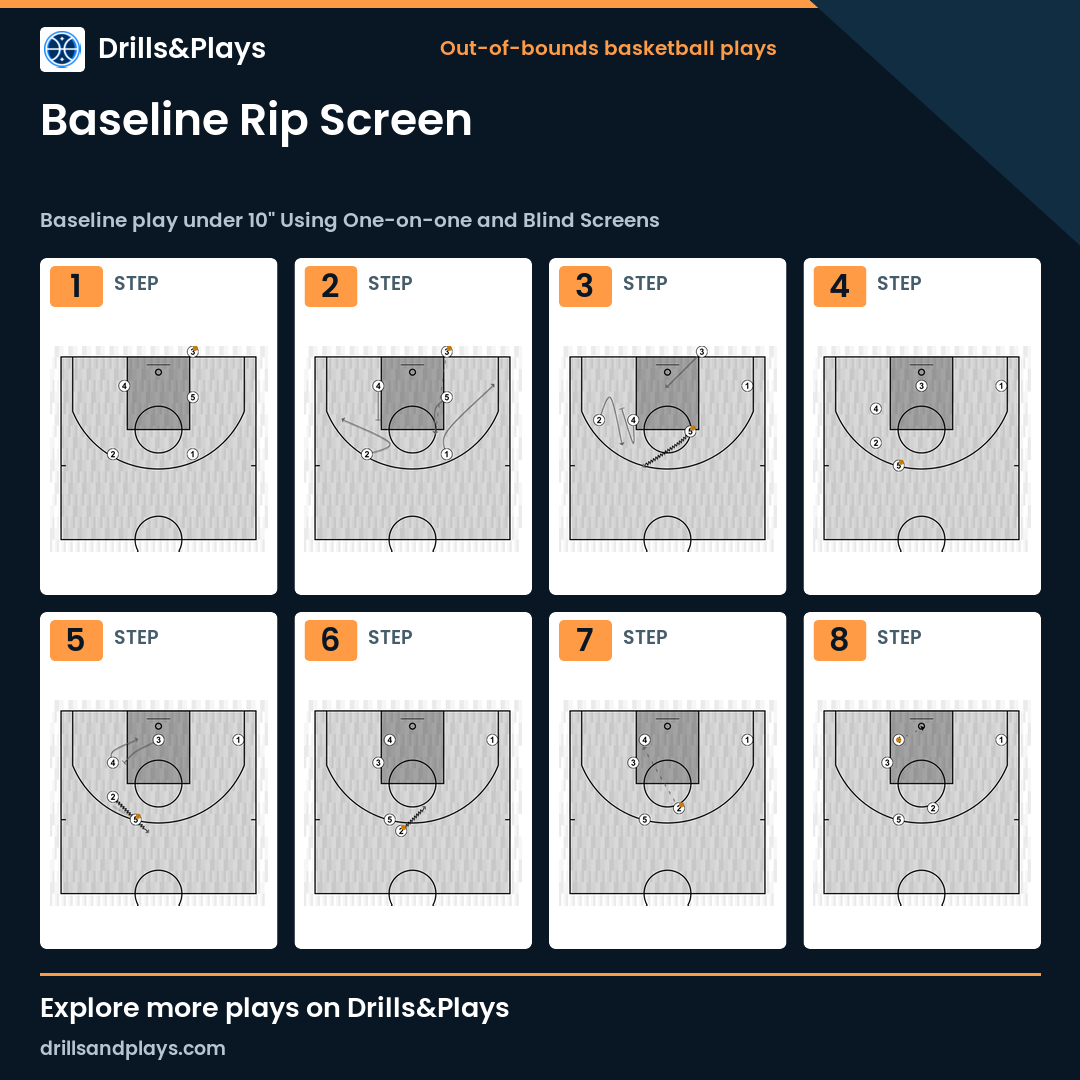
Baseline inbound to finish under the basket with player 4

STEP 2
Cuts for a fake reception by wings 2 and 1, and a LOB pass to 5 to receive at the top of the zone.
4 sets a Back Screen (or Screen Fake) if 2 cuts to the corner.
4 sets a Back Screen (or Screen Fake) if 2 cuts to the corner.

STEP 3
5, who has the ball, plays one-on-one with 2, who receives an Indirect Screen (Down Screen-Pin Down)

STEP 4
After the inbounds, 3 moves to receive the ball under the basket, while a BI and Handoff situation occurs at the top.

STEP 5
While the Handoff is played by 5 and 2, 3 sets a Rip Screen (Back Screen) for 4.
1 occupies the corner as a safety pass in case help comes
1 occupies the corner as a safety pass in case help comes

STEP 6

STEP 7

STEP 8
The complete play, step by step
Comments
Sign in or register to continue. Your draft will remain in this browser and will not be published automatically.